Input Devices
Input devices are used for feeding raw data into the computer.
The
foremost task of a computer is to accept data. An input device is used to
accomplish this task. An input device is used to enter the data and instructions
into the computer. Advancement in the computer technology has resulted in a
variety of input devices being available in the market. Input devices can be manual or automatic.
Manual Input
Devices- Manual input devices require that you physcally operate them in some way in order to input data.
The most common manual input devices are the keyboard and mouse. Other manual input devices are concept keyboard, mouse,
touch pad, tracker ball, joysticks, touch screens, scanners, digital cameras, microphones, graphics tablet.
Automatic input Devices- This class of device will input data automatically once the person has presented the data in a suitable format. Some of the automatic input devices are Sensors, Barcode reader, Optical Mark reader, Optical Character reader, magnetic stripe readers and MICR.
| Device | Usage |
| Keyboard | |
 |
Keyboard is the most popular input device that allows users to type alphabets, numbers, and operators, and also to control the cursor on the screen. The keys on this keyboard can be grouped in the sections- Function Keypad, Typical typewriter keys, cursor control keypad and Numeric Keypad. |
| Concept Keyboard | |
 |
Each button on a concept keyboard relates to a particular item or function. Buttons can be labelled with text or a picture. Fast food restaurants often use concept keyboards because very little training is needed to operate them and they're efficient - a single button can order an entire meal. |
| Numeric Keypad |
|
 |
Applications where only numeric data is to be entered. Inserting personal identification number (PIN) for Chip and PIN credit/debit cards, or when using an ATM machine to withdraw money or check a bank balance. |
| Pointing Devices |
|
| All applications which require selection from a graphical user interface. Forexample: the selection of data from a set list or menu. | |
| Mouse | |
 |
Mouse is a pointing device that allows user to point to a specific position on the screen. It has two or three buttons on top for selecting/executing different operations. Pressing buttons of mouse is known as clicking of mouse. The mouse is placed on flat surface and moved around to move its controlling arrow on screen. The arrow showing the position of mouse on screen is known as mouse pointer. |
| Touch pad |
|
 |
A touchpad is a small, touch-sensitive pad used as a pointing device on some portable computers e.g. laptop computers. By moving a finger or other object along the pad, you can move the pointer on the display screen. And you click by tapping the pad. |
| Tracker Ball |
|
 |
Used as an alternative to a mouse. To operate it the user rotates the ball which moves the pointer on screen. They are particularly easy to use for those with limited movement in their hands and are often used in Computer Aided Design (CAD) for their increased precision over a mouse. |
| Remote Control |
|
 |
A remote control is an electronics device, most commonly a television set, used for operating the device wirelessly from a short distance. With the help of remote control we can operate television set, video players/recorders, DVD players/recorders, satellite receivers, music systems, and data or multimedia projectors. |
| Joystick |
|
 |
It is a device used to control cursor on screen. Normally it is used in Games and specially designed simulation software. Since joysticks emulate the controls of planes and other aircraft, they are best suited for flight simulators and flying action games. |
| Graphic Tablet |
|
 |
A graphics tablet consists of a flat pad (the tablet) on which the user draws with a special pen. As the user draws on the pad the image is created on the screen. Using a graphics tablet a designer can produce very accurate on-screen drawings as if they were drawing on paper. |
| Touch Screen |
|
 |
Touch Screen is a display device, which is touch-sensitive and allows user to interact with the computer system by touching an area on the screen. |
| Magnetic Stripe reader |
|
 |
Data stored on the Magnetic strip (or stripe) is scanned and input into a computer system by a magnetic stripe reader. Magnetic stripe readers can be used at POS terminals,ATMs and in security applications |
| Chip readers and PIN pads |
|
 |
Payment cards, ID cards, door control systems, public transport tickets |
| Scanner |
|
 |
A scanner is a device used to capture digital images of printed documents, graphics or other printed media. |
| Digital Camera |
|
 |
A digital camera is a high-resolution camera, which captures images and stores them in digital format. It has provision to connect to the computer using special computer communication cables (such as USB cables). |
| Microphone |
|
 |
Microphone is a device used to accept audio inputs from the user. Webcams commonly have microphones built-in too. |
| Temperature Sensor |
|
 |
Temperature sensor is a chip that tells you what the ambient temperature is! Automatic washing machines, automatic cookers, central heating controllers, computer-controlled greenhouses, scientific experiments and environmental monitoring systems are using temperature sensor. |
| Pressure Sensor |
|
 |
Pressure sensors are used to measure intake manifold pressure, atmospheric pressure, vapor pressure in the fuel tank etc. Though the location is different, and the pressure being measured wary, the operating principles remain same. Burglar alarms, automatic washing machines, robotics, production line control, scientific experiments and environmental monitoring systems are using pressure sensors. |
| Light sensor |
|
 |
A light sensor generates an output signal indicating the intensity of light incident upon the light sensor. Computer controlled greenhouses, burglar alarm systems, robotics, production line control, scientific experiments and environmental monitoring systems are using light sensors. |
| Optical mark reader |
|
 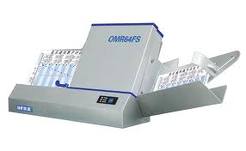 |
An Optical Mark Reader is a special scanning device that can read carefully placed pencil marks on specially designed documents. OMR is frequently used in forms, questionnaires, and answer-sheets. |
| Optical character reader |
|
 |
An optical character reader is a computer peripheral device enabling letters, numbers, or other characters usually printed on paper to be optically scanned and input to a storage device, such as magnetic tape. The device uses the process of optical character recognition Abbreviation (for both reader and recognition) OCR. |
| Bar code reader |
|
 |
Bar code reader is used to accept barcode inputs. A barcode is a series of vertical bars representing numbers and alphabets printed on product labels. One must have noticed all standard items like perfumes, greeting cards, books, cassettes available in the market have similar lines as shown in the figure, known as bar codes. These can be read with the help of bar code readers. |
| Video digitizer |
|
 |
A video digitizer takes an image from a video camera or television and digitizes it so it can be read by, and stored on, a computer. Video sequences captured using a video digitizer is often used in multimedia presentations. |
| Video camera |
|
 |
Inputting moving pictures, often pre-recorded, into a computer. |
| Web cam |
|
 |
A web cam is an easy to connect low-resolution digital camera normally employed for transfer of images on the web-based conferencing. |
| Light pen |
|
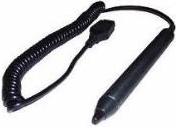 |
A Light pen is a device used for drawing pictures and for directly controlling screen operations. |
| MICR |
|
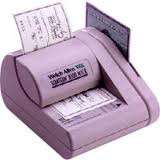 |
Magnetic ink characters appear at the bottom of cheques. Banks use Magnetic Ink Character Reader (MICR) to read the numbers from the bottom of cheques to obtain data such as account numbers and bank sort codes. A particular font is used that makes it easy for the machine to discriminate between characters. The ink is magnetised, this makes it immune to creases and dirty marks. |
